
Report - Product Pick List
Product Pick List
This report shows you a summary of all of the items that need to be fulfilled on any Unfulfilled/Partially Fulfilled orders.
This is often useful for merchants who need to know the total number of each item that needs fulfilling so they can pack them all at once.
Using this report, you can see how many of each item still need to be fulfilled.
Once an item is fulfilled, the remaining Fulfillable quantity adjusts automatically so it stays up to date.
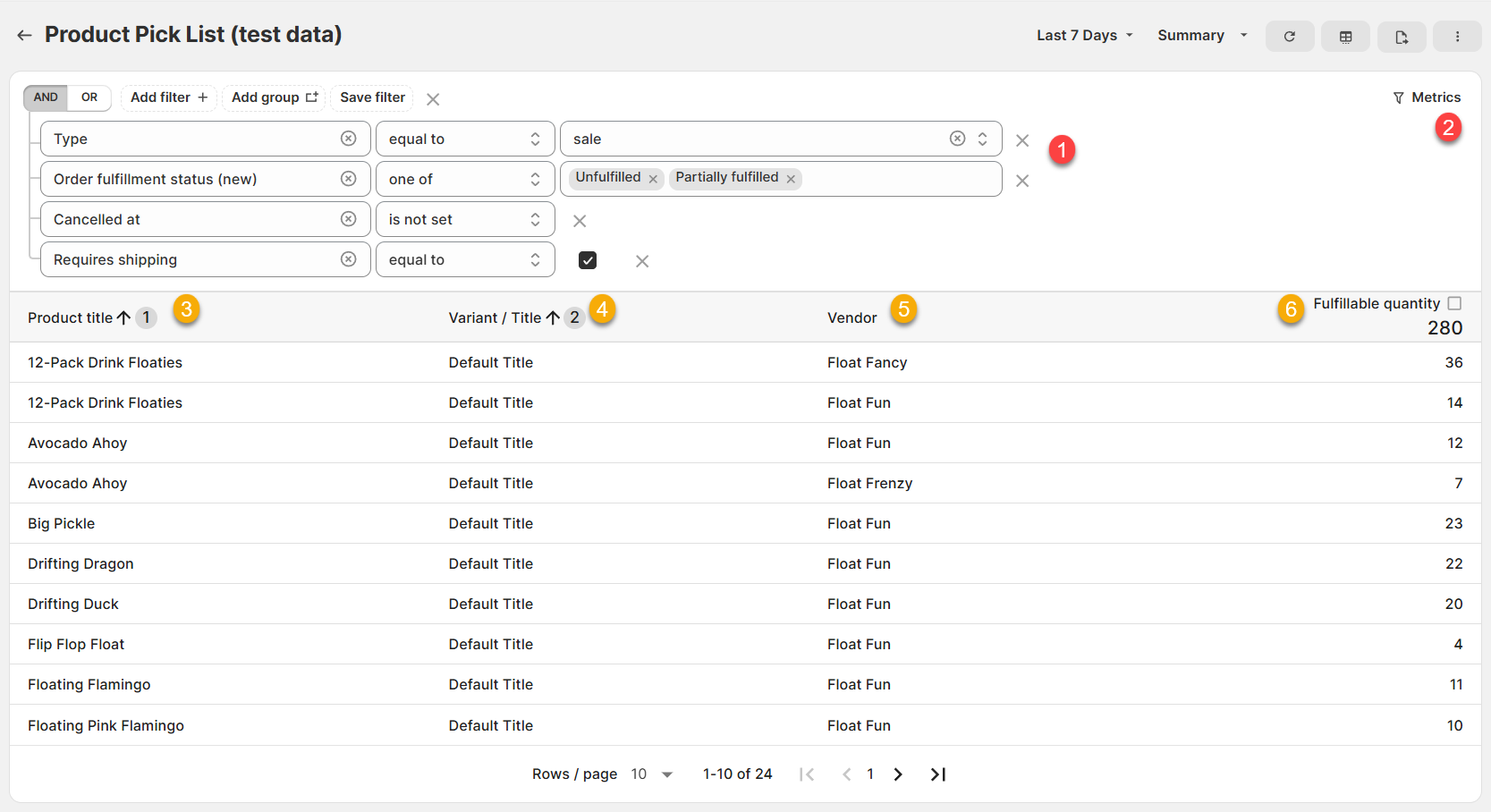
(click image to enlarge)
Here is what you need to be familiar with to understand the Product Pick List report:
1.) Type equal to Sale, Order fulfillment status (new) is Unfulfilled/Partially Fulfilled, Cancelled at is not set, Requires Shipping = true (FILTER).
This filter ensures that only the right sale lines are included in the report:
Has to be a type of sale (not a refund)
Has to be on an Unfulfilled/Partially Fulfilled Order
Order has to not be cancelled
Has to be an order that requires shipping
2.) Fulfillable Quantity, greater than 0 (METRICS FILTER): This metrics filter ensures that only items that still have a Fulfillable Quantity > 0 are included in the report.
For example, once an item no longer has any Fulfillable Quantity left (i.e. it's been fulfilled) that item will automatically be removed from the list.
3.) Fulfillable Quantity: How many units of that individual variant still need to be fulfilled.
For example, the Flip Flop Float has 4 units still to be fulfilled.
Like all Report Toaster reports, this report is fully customizable - so you can adjust the date range, add/remove columns, introduce a filter or change the sort to suit your individual needs.
See our basic guides here for more info.
For example, if you wanted the Pick List to include ALL variants that have been sold (regardless of whether they have fulfilled or not) then you can change the Order Fulfillment Status in the filter (and be sure to delete the metrics filter as well).
That way, even items that have already been fulfilled will show up in the report (with Fulfillable Quantity of 0) instead of dropping off.
For other premium reports you can add to your account, check out our other article guides here.